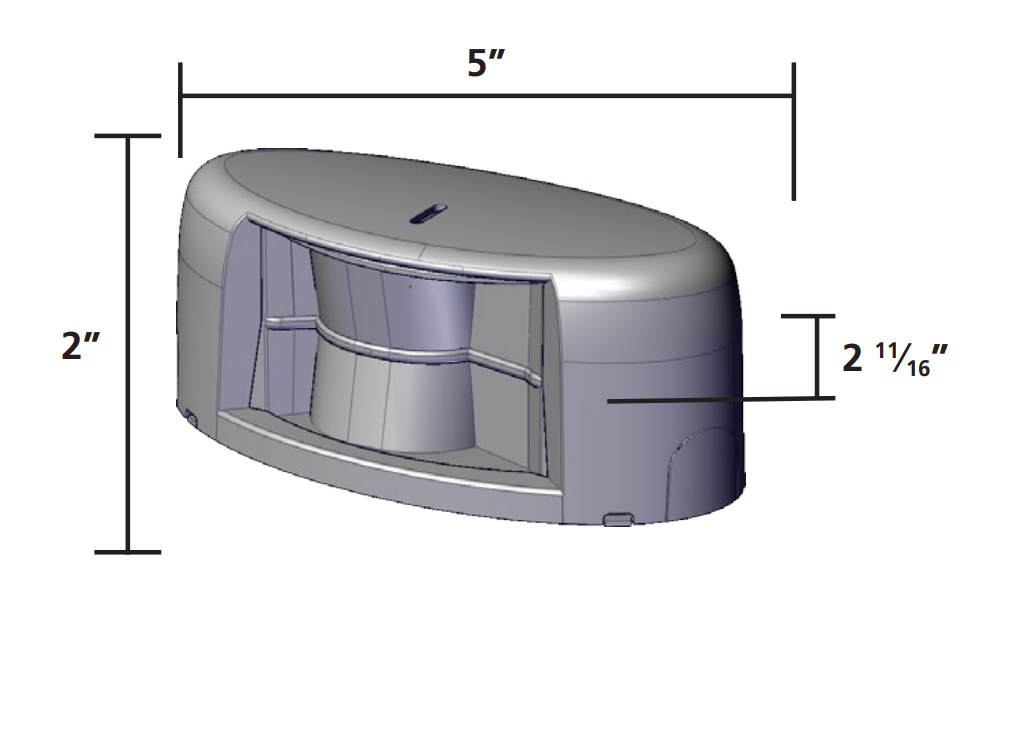
BEA LZR-MICROSCANHUB Standalone Door-Mounted Swing Door Safety System Hub Unit
- Current Trade Policy Costs Included In Price
- In Cart Discounts Offered on Many Products
- GSA, Net 30 and purchase orders available
- 4 In-Stock & ready to ship
Description
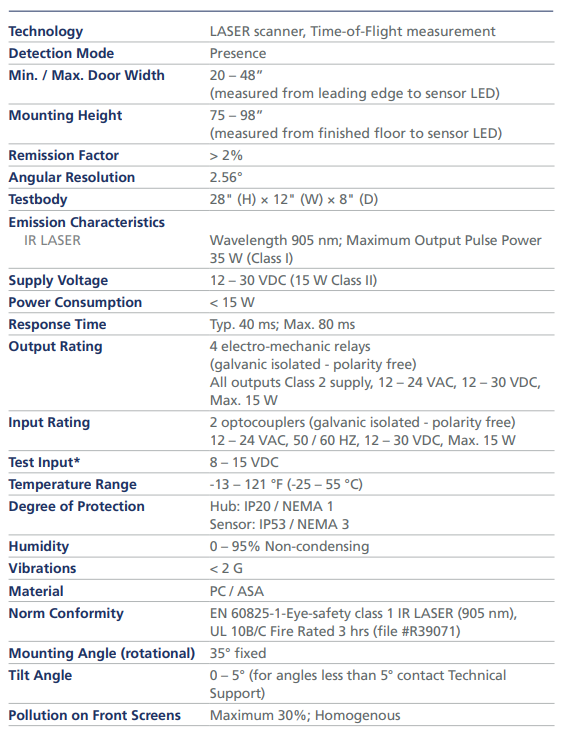
Discontinued by BEA. The LZR-FLATSCAN 3D SW is the updated version. The BEA LZR-MICROSCANHUB is a replacement hub for the LZR-MICROSCAN T, a door-mounted laser safety system for automatic swing doors. The system uses Time-of-Flight laser sensors on the door and a hub, runs on 12-30 VDC, and fits doors 20-48 in wide with sensors mounted 75-98 in high.
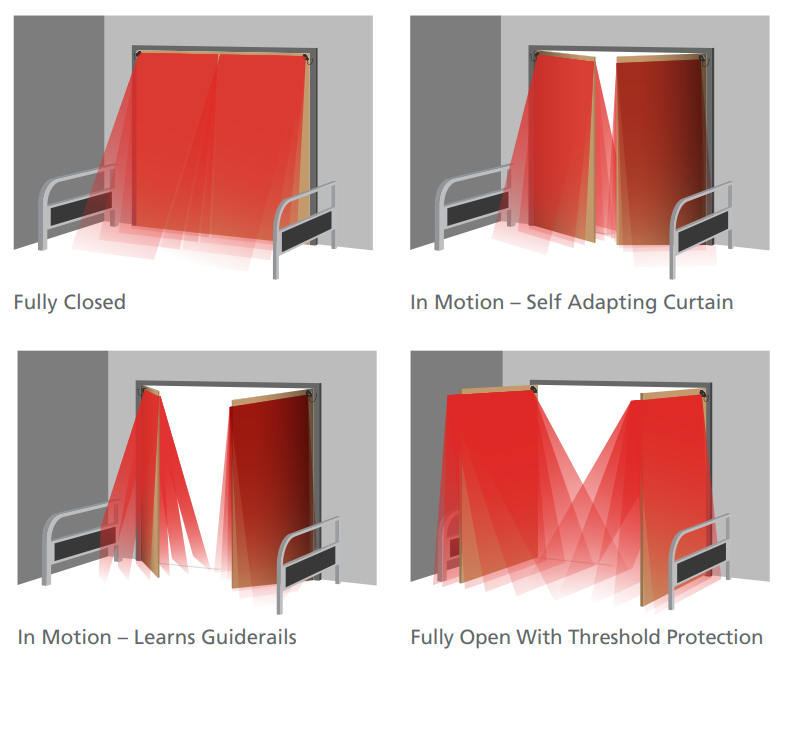
Detection does not depend on the floor, so weather and floor changes do not cause nuisance detections. Gyroscopes track door position. Pattern depth is adjustable and BEA states it exceeds ANSI A156.10 section 8.2.2.3, with coverage while the door is open, closed, opening and closing. BEA lists the system as UL 10B/C, fire rated up to 3 hours.
What's Included
- One LZR-MICROSCAN hub
Before You Order
- Hub only. Sensors, harnesses and power supply are sold separately.
- Power: 12-30 VDC, 15 W Class II. Hub outputs: 4 relays. Hub inputs: 2 optocouplers. Hub is IP20 / NEMA 1; sensors are IP53 / NEMA 3.
- Operating temperature: -13 to 121 °F.
- Other parts: MICROLEFT-T / MICRORIGHT-T (single sensors), MICROSCANHUB (hub), 1UT (single door universal kit), 2T and 2UT (pair door kits).
Easy to install
Highly accurate detection
Standards compliant
UL 10B/C Listed
Why am I getting a Height/Angle error?
1. The sensor is mounted incorrectly (i.e. handed sensors are installed in the opposite manner). Observe the hinge arrow on the sensor label.
2. The sensors are mounted to the header instead of to the door.
3. The sensor detects panic hardware installed on the door. Use the provided spacer.
4. The mounting template was used incorrectly.
Why am I getting an EPDS error?
1. The door did not open at least 80 degrees. Adjust the door for proper operation and then launch a new Learn.
2. The home switch is not breaking soon enough. Adjust the door for proper operation and then launch a new Learn.
Why am I getting Lost Message and Motor errors?
Harnesses may be loose/damaged. Verify all connection points. The door may have been impacted or struck by an object.
Why are the LZR-MICROSCAN sensors activating the door in a knowing-act application?
Knowing act is turned OFF. In the ADVANCED menu on the hub, change Knowing Act to ON.
On a pair of doors, if one door is manually pushed and held open, why does the system activate, causing the panic hardware on the closed door to jam?
Activation is not going through the hub. All activation should go through the hub first and then through Logic Modules. If activation cannot be initiated through the hub, BEA recommends setting the system to Advanced Safety.
Why won’t the doors activate?
The On/Off/Hold Open switch is preventing activation. Using the provided jumper, wire-nut the red and black wires together and plug it into the ON/OFF/HOLD port on the hub.
Why am I getting a Fields error?
1. There is an issue with the home switch. Ensure that the home switch is making and breaking correctly as the door cycles.
2. The door speed is set too slow; therefore, the door is not reaching a fully closed position before the system Learn completes.
Why am I getting Environmental errors?
Either the LZR-MICROSCAN power source is incorrect (e.g. powered from an unrecommended door control or from an AC transformer) or the temperature is too low or too high. Use from the LZR-MICROSCAN power supply included within the universal kits.
Why am I getting Boundary errors?
There is interference with sensor detection. Check transfer loop and door hardware. If the transfer loop is too long, trim it to an appropriate length. If hardware spanning the width of the door is causing interference, install the provided spacer.
Why is the door randomly stalling and/or recycling?
Either the detection width is not set correctly (i.e. the distance from the sensor LED to the leading edge of the door) or the Guiderail height is not set (in the BASIC menu).
All in stock orders typically ship the same business days or within 1-2 business days. Cut off for same day shipping is 2:30PM Central Time.
LEADTIME
Items with lead times typically ship in 4-7 business days.
FREE SHIPPING POLICY
Orders with free shipping may have longer lead times due to those items being shipped the most economical way. Free shipping on most orders over $195.00 does not include gate operators, loop sealant, and any extreme length or weight items
Our return policy lasts for only 30 days. If 30 days have gone by since your purchase, unfortunately we can’t offer you a refund. Some items such as Gate Operators or custom parts may not be returnable or carry a restocking fee if returned.
Protec Controls accepts purchase orders please contact us.
NET 30
We also support Net 30 terms on our website for easy ordering. Please fill out the form to the right with your company information and we will get your account setup to place Net 30 orders.
GOVERNMENT & GSA
Protec Controls accepts GSA SmartPay cards along with all major credit cards. For government quotes and purchase orders please email govsales@proteccontrols.com