DoorKing 9000 Manuals & Support

DoorKing 9000

The DoorKing 9000 is a commercial slide gate operator for gates up to 35 ft. The 1/2 HP models handle 1,000 lb and the 1 HP models 1,500 lb, at about 1 ft per second.

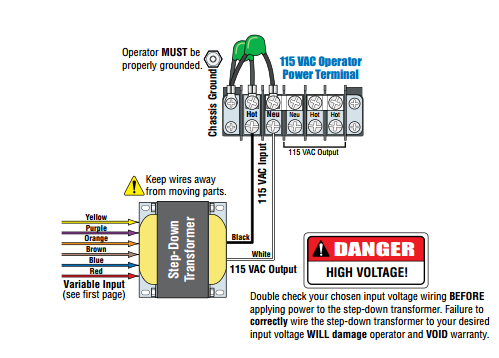
It is UL 325 Class I to IV and rated for 60 cycles per hour. It runs on 115 VAC, and the high voltage kit adds 208, 230, 460 and 575 VAC.

Identify your model

Models 9000-380 and 9000-381 are 1/2 HP. Models 9000-385 and 9000-386 are 1 HP. Use the current manual for circuit board 4405-018 Rev A or higher.

Older units have their own manuals, kept on this page as earlier editions.

Key specs

Class UL 325 Class I, II, III and IV
1/2 HP 115 VAC, 5.4 A, gates up to 1,000 lb
1 HP 115 VAC, 9.7 A, gates up to 1,500 lb
Gate length Up to 35 ft
Cycles 60 per hour
Speed About 1 ft per second
Board 4405-018

Manuals and documents

Installation Manual

Quick Start

Spec Sheet

Other documents

Troubleshooting

Find which part has the problem first: the operator, the loop system or the keying devices. The input LEDs on the control board show which inputs are active.

Operator will not run, power LED off

  • Check that power to the operator is on.
  • Check for 115 VAC at terminals 19 and 20. If the voltage is good, check the terminal strip or replace the circuit board.
  • An overheated board transformer shuts the board down. Turn power off, let it cool for several minutes and test again.

Operator will not run, power LED on

  • At least one monitored photo eye or edge must be connected in each entrapment area, with its UL 325 input switched on.
  • Press the motor reset button firmly.
  • Jumper terminals 1 and 2 (or 1 and 5) for a moment. If the input LED does not light, check the terminal strip or replace the board.
  • Test the motor directly as the manual shows. If it runs in one direction only, check the motor, motor capacitor and wiring.

Entrapment input LED on or blinking

  • LED on: the photo eye or edge has a fault or its wiring is shorted.
  • LED blinking: the device is not connected or its wiring is open.

Gate opens but will not close

  • Any input LED that stays on holds the gate open. Disconnect keying devices one at a time until it goes off.
  • An active photo eye, edge or loop detector also holds the gate open.
  • The operator may be in a soft shutdown. Activate any keying device to clear it.
  • For automatic close, check that SW 1, switch 4 is ON.

Alarm sounding or chirping

  • This is a hard shutdown. The alarm sounds for 5 minutes, then chirps every 5 seconds until the operator is reset.
  • Check the whole gate area for an obstruction or damage first, then press the reset button or turn power off and back on.
  • If the cause cannot be found and fixed, leave the operator off until a technician checks it.

Gate stops and reverses

  • Check the reversing sensitivity.
  • Disconnect the gate and check that it rolls freely. The gate may be too heavy.

Common questions

The 1 HP models handle gates up to 1,500 lb and 35 ft. The 1/2 HP models handle 1,000 lb.

At least one monitored device in each direction of gate travel, so a minimum of two.

Yes, with the optional DoorKing 2600-266 high voltage kit. It steps the incoming voltage down to the 115 VAC the operator uses.